Recurring Invoices: Setting Up Subscription Billing
The Issueable Team
Small business operations
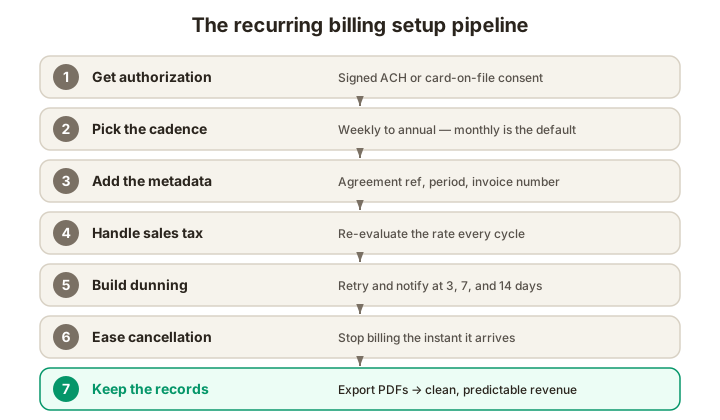
Recurring invoices keep cash predictable for retainers, subscriptions, and service contracts: but only if the authorization, billing, and dunning workflow is set up correctly. Here's the practical version.
Why recurring invoices matter
If you sell continuing services, recurring invoices can make billing more consistent. They improve forecasting only when authorization, collections, cancellations, and tax treatment are handled correctly; an issued invoice is not the same as collected cash.
But recurring billing fails in predictable ways. Authorization is sloppy and the buyer disputes the charge. Cards expire silently — four months of revenue gone before you notice. A state sales-tax rate changes and you collect the wrong amount for an entire quarter. The customer cancels by email but the invoice still goes out, and now you're explaining yourself to their bank.
Here's how to set recurring invoicing up so it stays clean.
Step 1: Get authorization in writing
Every recurring invoice needs a paper trail showing the customer agreed to be charged on a schedule. The form depends on how you're collecting payment:
- ACH debit (US): NACHA's Operating Rules require written or electronically authenticated authorization before you can debit a customer's bank account. The authorization has to identify the amount, the cadence, and the customer's right to revoke. NACHA also requires you to keep the authorization for two years after the last debit. A signed retainer agreement or a checkbox-and-signature flow at sign-up both satisfy this.
- Card on file (US/Canada): Card-network rules (Visa, Mastercard, Amex, Discover) require explicit cardholder consent before storing a card for recurring use. The consent has to disclose the cadence, the amount (or the formula for a variable amount), and how to cancel. Stripe, Square, and other PCI-compliant processors handle the storage; you handle the consent flow.
- B2B wire or invoice push: A signed master services agreement (MSA) or retainer letter naming the cadence and amount is enough. The buyer's AP team will only pay against an invoice they expect.
A few details that catch businesses out:
- Variable-amount authorizations (e.g., usage-based billing) require disclosing how the amount is calculated, not just the cap.
- Free trials that auto-convert must comply with ROSCA in the US: clear and conspicuous disclosure, simple cancellation, and affirmative consent. Skipping this is the single fastest way to attract an FTC enforcement action.
- Entity changes need review. If a customer is acquired or changes legal entity, confirm whether the existing contract and payment authorization remain valid before billing the successor.
Step 2: Pick the right cadence
Recurring billing typically runs on one of four cadences:
- Weekly. Common for staffing agencies and time-billed retainers. High administrative cost relative to the invoice value; reserve for high-frequency engagements.
- Monthly. The default for retainers, SaaS, and most professional services. Bills typically issue on the same calendar day or the same business day each month.
- Quarterly. Common for annual contracts billed in installments and for clients who want to align with quarterly budgeting cycles. Better cash flow than annual; less admin than monthly.
- Annual. Maximum cash flow per invoice, often with a small discount to incentivize. Common for SaaS, though annual billing concentrates churn risk into one renewal date.
Choose a cadence that matches service delivery, the contract term, the buyer's AP process, and your cash needs. Monthly billing does not create a monthly cancellation right unless the agreement or law provides one.
Step 3: Issue each invoice with the right metadata
Each individual invoice in a recurring series should look the same as a one-off invoice (same numbering scheme, same business and bill-to info, same line-item table) with two additions:
- A reference to the underlying agreement. "Per MSA dated Jan 5, 2026" or "Subscription #SUB-0042" tells AP how to route the invoice without a fresh approval cycle.
- The billing period covered. "Service period: June 1–30, 2026" helps AP identify what the charge covers.
Other essentials don't change: unique invoice number, issue and due dates, line items, taxes, totals, payment instructions. If you're using a tool that batches recurring invoices, double-check that it increments the invoice number. Duplicate numbers can confuse reconciliation and trigger an AP review.
Step 4: Handle sales tax dynamically
The most common recurring-billing tax mistake is locking in the rate at sign-up and never revisiting it. Three things change between cycles:
- State sales-tax rates change. State and local rates update at quarter or year boundaries; what was 7.25% in Q1 2026 might be 7.5% by Q3.
- The buyer's location can change. Remote-first companies relocate employees and headquarters; a recurring SaaS subscription billed to "California" today might be a "Texas" customer in three months.
- Your nexus and registration duties can change. State thresholds, transaction-count tests, marketplace rules, effective dates, and taxable-service rules differ and continue to change.
Re-evaluate tax at the moment the invoice generates. Most billing platforms (Stripe Tax, Avalara, TaxJar) do this automatically. If you're invoicing manually, set a quarterly check on the rates you're applying and pull the current value from each state's revenue department.
Step 5: Build a dunning process before you need it
Cards decline for temporary and permanent reasons. If you do not have a measured retry-and-notify process, recoverable payments can slip away as cards expire, accounts change, or issuers decline a transaction. Track your own decline codes and recovery rate instead of borrowing an industry average that may not fit the business.
A standard dunning sequence:
- Day 0 (decline). Email the customer immediately: "Your card was declined; we'll retry in 3 days." Soft, non-accusatory tone.
- Day 3. Retry the card. If it succeeds, send a paid receipt. If it fails, email again.
- Day 7. Second retry. If failed, escalate the email, direct ask to update the card.
- Day 14. Third retry. If failed, pause the service and notify the customer that access is suspended pending payment.
- Day 21+. If still unresolved, mark the account as churned and stop trying.
Card-network rules limit how aggressively you can retry. Visa, for example, caps reattempts at 15 per transaction in any rolling 30-day window (with per-retry fees beyond that); check your processor's documentation. Most platforms (Stripe, Chargebee, Recurly) implement these limits automatically.
For ACH, NACHA rules let you reinitiate a debit returned for insufficient funds up to two times, within 180 days of the original entry. After that, the buyer has to re-authorize.
Step 6: Make cancellation frictionless
Cancellation policy is where recurring billing relationships live or die. Get these right:
- Make cancellation clear and usable. The FTC's 2024 Click-to-Cancel rule was vacated in 2025, and the agency opened a new rulemaking inquiry in March 2026. Separately, ROSCA requires a simple cancellation mechanism for covered online consumer negative-option offers, and state laws may impose additional requirements.
- Confirm cancellations in writing. When a customer cancels, send a confirmation email with the cancellation date and the date of the last billing cycle. This is your evidence if a charge slips through after.
- Apply the effective date correctly. Stop future charges when the agreement and applicable law require. Confirm whether service continues through a paid period and whether any prorated refund is due.
For B2B retainers, "cancellation" usually means non-renewal at the end of the term. Build the renewal window into the contract: "Either party may terminate at the end of the current quarter on 30 days' written notice." The recurring invoice stops automatically when the contract does.
Step 7: Keep the records
Keep invoices, receipts, authorizations, and payment records for the periods required by the applicable tax, payment-network, contract, and industry rules. IRS retention periods vary with the record and tax issue; there is no universal seven-year rule. NACHA authorization-retention rules should be applied to the relevant entry type and measured from termination or revocation where the rule specifies.
Don't rely on your billing platform alone for retention. Export the invoice PDFs to your own file storage on a quarterly cadence. Platforms get acquired, change retention policies, or lose data — and you lose audit defense when they do.
Common mistakes to avoid
- Mishandling a cancellation. Record the request, confirm its effective date, and stop unauthorized future charges.
- Letting cards expire silently. If your processor offers an account-updater service, evaluate it alongside clear retry and customer-notification rules. Expired or replaced cards can otherwise cause avoidable payment failures.
- Locking in tax at sign-up. Re-evaluate every cycle.
- Sending the same invoice number on every cycle. Use a unique identifier for each invoice under the numbering rules that apply to you.
- Skipping the receipt. Every successful recurring charge should produce a paid receipt, not just an invoice. The receipt is the customer's record that they paid.
- No proration. When a customer upgrades or downgrades mid-cycle, the next invoice should prorate the change. Skipping this creates a billing-fairness complaint pattern that turns into chargebacks.
A 10-line checklist before you turn on recurring billing
- Signed authorization (ACH) or explicit consent (card) on file
- Cadence and amount in writing
- Invoice numbering scheme that increments across cycles
- Sales-tax recalculated each cycle
- Dunning sequence in place (3-, 7-, 14-day retries)
- Cancellation process tested end-to-end
- Receipt sent on every successful charge
- Invoice PDFs exported to your own storage quarterly
- Card-account-updater enabled
- A monthly review of failed-payment metrics
Ready to set up recurring invoicing?
Issueable's invoice generator handles the billing-period and reference fields cleanly, exports a clean PDF on every cycle, and pairs naturally with whatever payment processor you're already using. Start an invoice.
Frequently asked questions
- What's the difference between a recurring invoice and a subscription?
- A recurring invoice is a billing document that issues on a fixed cadence (weekly, monthly, quarterly) for the same or similar service. A subscription is a commercial relationship where the buyer commits to ongoing service for a defined or open-ended period. Most subscriptions are billed via recurring invoices, but you can also bill a retainer with recurring invoices without selling a 'subscription' product. Practically, the documentation looks the same; the legal framing differs in consumer-protection contexts (cancellation rights, auto-renewal disclosures).
- Do I need a signed authorization to bill a client repeatedly?
- For ACH debits, yes: NACHA's Operating Rules require written or 'similarly authenticated' authorization from the customer before pulling funds, and the authorization has to be retained for two years after the last debit. For card-on-file recurring charges, the card networks (Visa, Mastercard, Amex) require explicit cardholder consent at sign-up, and US consumer protection law (ROSCA) requires clear disclosure of the recurring nature before checkout. For business clients paying via wire or ACH push, a recurring invoice with stated terms is typically enough, but a master services agreement or signed retainer letter is better.
- How do I handle sales tax on a recurring invoice?
- Tax treatment depends on what is sold, where the supply is sourced, the customer's status, and your registrations. Reassess relevant facts when they change, including the service, billing location, exemption documentation, nexus, and rate. Do not assume the original checkout calculation remains correct indefinitely.
- How do I handle dunning on failed recurring payments?
- Dunning is the systematic retry-and-notify sequence for failed payments. A common approach: retry the card 3 days, 7 days, and 14 days after the initial decline; email the customer at each retry; pause the service after the third decline. Card-network rules limit how often you can retry: Visa caps reattempts at 15 per transaction within a rolling 30-day window and fines merchants for excessive retries. Stripe, Chargebee, and Recurly handle this automatically. If you're billing manually, document each retry and notification so you can prove good-faith attempts in any future dispute.
- Can I change the price on a recurring invoice mid-contract?
- Follow the contract, card-network rules, and consumer auto-renewal laws that apply to the buyer and transaction. Notice periods and consent requirements vary; there is no safe universal 30-day rule. State the new amount, effective date, and cancellation or non-renewal process before charging it.
- What happens if a recurring client cancels but I keep billing?
- Honor the cancellation under the agreement and applicable law, confirm the effective date, and stop charges that are no longer authorized. A post-cancellation charge may lead to a dispute or consumer-protection claim. Whether service ends immediately or at the close of a paid term depends on the agreement and governing rules.