How to Invoice a Client: A Step-by-Step Guide
The Issueable Team
Small business operations
Invoicing a client isn't complicated, but small mistakes cost you days of float and the occasional bad debt. Here's the short, practical version: what to put on the invoice, when to send it, and how to chase a late payer without burning the relationship.
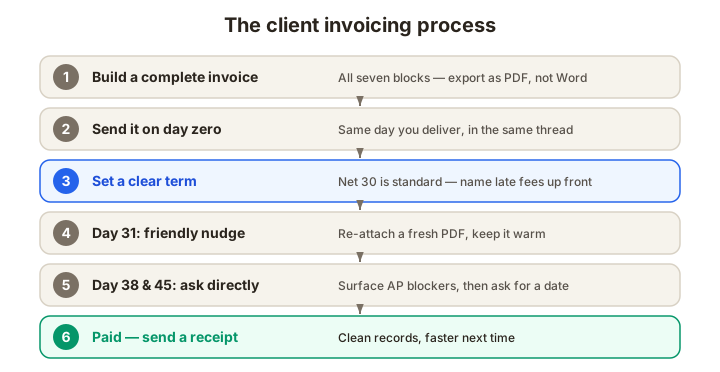
Why the mechanics of invoicing matter
Many late payments begin as ordinary process friction: a missing due date, an omitted PO number, or an invoice sent to the wrong cost center. Fixing the invoice itself can be one of the least expensive cash-flow improvements a small business makes.
This is the working version of how to invoice a client: what a professional invoice includes, when to send it, and how to handle the awkward second and third follow-ups.
What to include on a client invoice
A practical invoice has seven core blocks, although legal and buyer requirements vary.
- Your business info. Legal name, address, email, and phone. If you're incorporated, use the legal entity name exactly as it appears on the buyer's master vendor list — mismatches trigger AP reviews.
- Client info. The bill-to name, address, and (where possible) a named AP contact. "Accounts Payable" gets routed to a queue; "Jamie Rivera, Facilities AP" goes to a person.
- A unique invoice number. Use a consistent numbering system that meets any applicable tax rules and does not create duplicates.
- Issue date and due date. Use the term agreed with the buyer and include a calendar due date to remove ambiguity.
- A clear line-item table. Description, quantity, rate, and line total. One row per deliverable. Specific descriptions make approval and later recordkeeping easier.
- Subtotal, discount, tax, and grand total. Applied in that order. If you're collecting sales tax, show the rate and amount explicitly.
- Payment instructions. Bank details, a pay link, or a note that your Stripe/Square/ACH link is in the body of the email. If the buyer has to ask how to pay, you've lost a day.
Useful extras include a short thank-you line, your logo, and any late-fee term that was agreed in advance and is permitted by applicable law.
When to send the invoice
Invoice promptly once the agreed billing trigger occurs. The right trigger depends on the engagement:
- For project work, send the invoice the moment you deliver the final asset: same day, ideally within the same email thread. The buyer is still in the "I owe this person money" headspace; don't wait for the Monday admin block.
- For retainers, follow the agreement: some are billed in advance and others in arrears.
- For trades and contracting, invoice at the milestones you quoted. If your estimate said "50% on deposit, 50% on completion," stick to it, changing the cadence after the fact feels like a renegotiation.
- For e-commerce and one-off sales, a receipt confirms payment, but it may not replace a tax invoice where one is required.
Payment terms, in plain English
The four terms you'll see most often:
- Due on receipt. Pay now. Common for small one-off jobs and new clients.
- Net 15. Pay within 15 days, subject to the agreed starting date.
- Net 30. Pay within 30 days, subject to the agreed starting date.
- Net 60 / Net 90. Pay within 60 or 90 days. Common with enterprise AP, sometimes non-negotiable. If you're offered these terms, consider pricing in the cost of the float.
Late-fee enforceability depends on your contract, the buyer's policies, and local law, so treat this as a placeholder rather than universal legal advice. If you do charge late fees, spell out the rate and when it starts, and make sure the term is included before the invoice goes out. A common clause is "Invoices unpaid after 30 days accrue a 1.5% monthly late fee," but you should only use a rate that is valid where the work is performed and where the customer is located.
Following up on late payments
A predictable follow-up sequence matters. This example starts gently and escalates only when needed; adjust the dates to the contract and account:
- Day 31: the nudge. Short, warm, attaches a fresh PDF. "Hi Jamie, just flagging that invoice INV-0042 is showing as unpaid on our side. Attaching in case it got lost. Happy to resend to a different address."
- Day 38: the second nudge. Still friendly; this time ask a question. "Wanted to check whether this needs a PO number or an updated entity name on our end — anything that'd help it clear AP?"
- Day 45: the structured ask. Move from friendly to direct. "Could you let me know the payment date we can plan around? Happy to jump on a quick call if it's easier."
- Later escalation. If reminders fail, consider a payment plan, a formal demand, collections, or legal advice based on the amount and governing rules. Ask an accountant before treating a balance as bad debt.
Avoid chasing daily — it teaches the buyer to ignore you — and don't lead with late fees in the first nudge.
Common invoicing mistakes that slow payment
- Using the wrong format. PDF is a good default, but the buyer may require a portal or structured e-invoice. Confirm before sending.
- Missing PO number. If the buyer requires a PO, an invoice without it may be held or rejected. Confirm the requirement at the start of the engagement.
- Vague line items. "Consulting" is worse than "Kickoff workshop, May 14, 4 hours." Specifics survive AP.
- No due date. "Payable upon receipt" is ambiguous. Pick a concrete date.
- Different payee name than your contract. AP matches these. Mismatch = held invoice.
A 5-minute invoice checklist
Before you hit send, confirm:
- Invoice number is sequential and unique
- Client bill-to name matches how they appear on your contract
- Issue date and due date are both filled in
- Each line item has a clear, specific description
- Subtotal, tax (if applicable), and total are all correct
- Payment instructions or a pay link are visible
- If the buyer requires one, the PO number is on the invoice
- The file is a PDF, not a Word doc
That's the whole job. Most of the value comes from doing the boring fields right the first time.
Ready to invoice?
Issueable's invoice generator covers all seven blocks above, renders a clean PDF in about 60 seconds, and (if you've already sent a quote) carries the client details and line items over so you're not retyping. Start an invoice.
Frequently asked questions
- What information should always be on a client invoice?
- The exact legal requirements depend on the transaction and jurisdiction. A practical business invoice usually includes the seller and buyer names, a unique invoice number, issue and due dates, clear line items, applicable tax, the total due, currency, and payment instructions. Add any tax registration, purchase-order, or industry-specific fields the buyer or governing rules require.
- What does Net 30 mean on an invoice?
- Net 30 generally means payment is due 30 calendar days after the date specified by the agreement, often the invoice date. Confirm the starting date and actual due date because contracts and buyer systems can define the clock differently. Net 15, Net 60, and Net 90 use the same idea with different periods.
- Can I legally charge late fees on an invoice?
- Late-fee enforceability depends on your contract, the buyer's policies, and local law, so treat this as a placeholder rather than universal legal advice. If you do charge late fees, spell out the rate and when it starts, and make sure the term is included before the invoice goes out. A common clause is 1.5% per month on the unpaid balance, but you should only use a rate that is valid where the work is performed and where the customer is located.
- When should I send the invoice after finishing the work?
- Send it as soon as the contract allows and your billing trigger is complete. That may be delivery, acceptance, the start of a retainer period, or a stated milestone. Follow the agreement and the buyer's submission process rather than assuming every engagement is billed on completion.
- What's the best way to follow up on a late invoice?
- Follow up shortly after the due date, reattach the invoice, and ask whether anything is blocking approval. If it remains unpaid, ask for a specific payment date and follow the escalation steps in your contract. The timing should reflect the amount, relationship, dispute status, and local collection rules rather than a universal day count.
- Should I send an invoice as a PDF or a Word doc?
- Use the format the buyer's accounts-payable process accepts. PDF is a reliable default because it preserves layout, but some buyers require a portal upload, structured e-invoice, or another file type. Avoid an editable Word document unless the buyer specifically requests one.