Purchase Order Workflow: From PO to Payment
The Issueable Team
Small business operations
The PO-to-invoice workflow: when a buyer requires a purchase order, what to check, how to handle changes, and where the PO number belongs.
What a purchase order is and why it matters
A purchase order (PO) is a formal authorization from a buyer to a vendor: "We approve you to provide [scope] for [amount] by [date]. Here's your PO number for reference."
For the buyer, a PO creates an internal audit trail and can document spending approval. For a vendor, it is evidence of an authorized order, not a guarantee of payment.
When a buyer requires a PO, following that workflow can prevent avoidable matching and approval delays. Payment still depends on performance, acceptance, invoice accuracy, contract terms, and the buyer's ability to pay.
Who uses purchase orders
Often use POs:
- Organizations with formal procurement controls
- Government and nonprofit organizations
- Regulated industries (finance, healthcare)
- Any organization with formal procurement processes
May use simpler purchasing processes:
- Freelancers and solopreneurs
- Startups
- Retail or e-commerce
Ask the buyer whether the purchase requires a PO. Company size is not a reliable substitute for the buyer's actual policy.
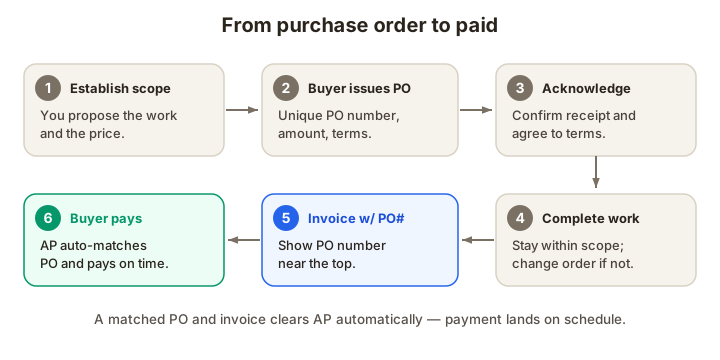
The purchase order workflow: step by step
Step 1: Establish the scope and price
You propose the work (via email, proposal, or quote). The scope and price are clear: "Brand strategy: $15,000. Deliverables include strategy report and three brand concepts. Delivery: June 30, 2026."
Step 2: Buyer issues a PO
The buyer's procurement team creates a purchase order with:
- A unique PO number (e.g., PO-2026-05421)
- Your company name and address
- Description of goods/services
- Quantity and unit price
- Total amount
- Delivery date
- Payment terms (usually referencing their standard terms, e.g., "Net 30")
- Special instructions (e.g., "Invoice must reference PO number")
They email it to you or upload it to their vendor portal.
Step 3: You acknowledge the PO
Some buyers ask for written acknowledgment: "Please confirm that you've received the PO and agree to the terms."
A simple email reply is fine: "Received PO-2026-05421. We'll deliver by June 30. Thank you."
Step 4: You complete the work
Execute the project as scoped. If scope changes come up, don't proceed without getting a change order (more on that below).
Step 5: You invoice with the PO number
When the work is done, you invoice — with the PO number displayed prominently: "PO: PO-2026-05421" near the top of the invoice.
The buyer may match the invoice against the PO and evidence of receipt or acceptance. A mismatch can trigger review; a match does not necessarily mean immediate approval.
Step 6: Buyer pays
The buyer's AP department completes its required checks and schedules an approved invoice under the agreed terms.
When to ask for a PO (and when not to)
Ask for a PO if:
- The buyer's procurement policy or contract requires one.
- You're doing ongoing or repeat work. A PO formalizes the relationship and makes invoicing automatic.
- The buyer mentioned "PO" or "purchase order" in any conversation. Take the hint.
- You need documented authorization for the buyer's order.
Don't ask for a PO if:
- The buyer said they don't use POs. Respect that; just invoice normally.
How POs can reduce payment delays
When a buyer requires a PO, supplying the right reference can remove one source of delay. This example illustrates the process difference without predicting a payment date:
Without a PO:
- You send a quote. Buyer reviews.
- Buyer approves (maybe after negotiation).
- You start work.
- You invoice when done.
- Buyer's AP receives the invoice, doesn't recognize it, asks for clarification.
- Back and forth via email.
- Finally, invoice is approved and paid.
With a PO:
- Buyer sends you a PO (internal approval already done).
- You start work.
- You invoice with the PO number.
- Buyer's AP matches the PO and invoice automatically.
- Approved without manual review; payment scheduled per terms. The actual timing depends on the agreed term and the buyer's approval process. A PO helps only when it is required, accurate, and properly matched.
Handling scope changes with POs
The biggest risk with POs is scope creep. If the PO is for $15,000 and you later realize the work requires $18,000, you can't just invoice for $18,000. The buyer will reject it.
Instead, issue a change order:
Email the buyer: "During work on [project], we discovered [scope change]. This will require an additional $3,000 and push the delivery date to [new date]. Shall I proceed?"
Get written approval (email is fine) before doing the extra work. Then, when the change order is approved, ask the buyer to issue a new PO for the $3,000, or ask them to approve an invoice that exceeds the original PO amount.
Do not assume the buyer will pay above the PO amount. Obtain the buyer's required written approval and PO amendment or change order before doing the extra work.
Common PO mistakes
1. Invoicing without referencing the PO number
Mistake: You invoice for $15,000, but forget to include the PO number.
Result: The invoice may be held for manual review or returned for correction.
Fix: Include the PO number where the buyer's instructions require it.
2. Invoicing for more than the PO amount
Mistake: PO is for $15,000, but you invoice for $18,000 because scope crept.
Result: Invoice is rejected or held until a change order is issued.
Fix: Don't start work on scope changes. Get a change order in writing first.
3. Not confirming the PO amount
Mistake: You discussed $15,000, but the buyer issued a PO for $12,000. You invoice for $15,000.
Result: Mismatch. Rejected invoice.
Fix: Review the PO carefully when you receive it. If the amount doesn't match your discussion, clarify immediately.
4. Waiting too long to invoice
Mistake: You complete the work in May but don't invoice until July.
Result: The buyer's PO approval expires or is forgotten. Payment is delayed while AP re-authorizes.
Fix: Invoice within a few days of delivery. Delays give PO approvals time to expire or go cold.
Tracking POs for your business
Keep a simple spreadsheet:
| PO Number | Buyer | Amount | Invoice Date | Invoice # | Payment Date | Notes |
|---|---|---|---|---|---|---|
| PO-2026-05421 | ABC Corp | $15,000 | May 10 | INV-0150 | May 20 | Brand strategy |
| PO-2026-05422 | XYZ Corp | $8,500 | May 15 | INV-0151 | June 2 | Website redesign |
This makes it easy to spot payment delays. If a PO hasn't been paid 35 days after invoice (and you agreed to Net 30), you know to follow up.
Ready to issue your first PO?
If you're a vendor waiting for a PO from a buyer, ask directly: "Do you use purchase orders? If so, can you send one?"
If you're issuing POs to your suppliers, Issueable's purchase order generator creates professional POs in seconds. Start now.
Frequently asked questions
- What is a purchase order, and who uses them?
- A purchase order (PO) is a buyer-issued document authorizing specified goods or services under stated terms. Organizations use POs to control spending and create an audit trail, but practices vary by buyer and transaction. Ask whether a PO is required instead of relying on company size.
- Can I invoice without a PO if the buyer requires one?
- If the buyer requires a PO, an invoice without the required reference may be rejected or held. Confirm the process before starting work, including who issues the PO, whether it authorizes performance, and where the number must appear.
- Who creates the PO, me or the buyer?
- The purchasing organization issues the PO to its supplier. When you buy from your own supplier, your business may issue a separate PO in that relationship. Confirm that the person issuing it has authority and that the document matches the agreed scope.
- Do I need to sign the PO?
- Follow the PO and contract instructions. Some buyers ask for acknowledgment or signature, and accepting a PO can have contractual consequences. Review conflicting or added terms before signing or beginning performance, and obtain legal advice when the stakes justify it.
- What if the PO amount doesn't match what we discussed?
- Stop and clarify before proceeding. Email the buyer: 'I received the PO for $10,000, but we discussed $12,000. Can you confirm which is correct?' Mismatches cause payment holds and disputes. Get clarity in writing before you start work.
- Can I invoice more than the PO amount?
- Only if you get a written change order. If the PO is for $10,000 and your invoice is for $12,000, the buyer will either reject it or require a change order before approving payment. Always stay within the PO amount, or get explicit written approval for overages before doing the work.