E-Invoicing for Small Businesses: What Actually Changes
The Issueable Team
Small business operations
Emailing a PDF is not e-invoicing. An e-invoice is structured invoice data that a buyer or tax authority can read automatically. Here is what small businesses need to know before a client asks for one.
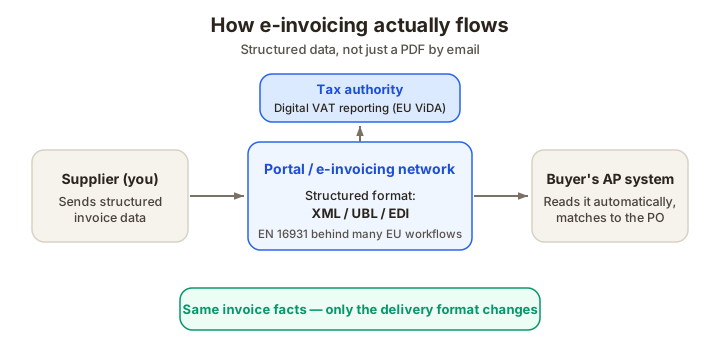
E-invoicing is not just "send it by email"
Most small businesses use "electronic invoice" to mean "I emailed a PDF." Buyers and tax authorities increasingly mean something narrower: an invoice in a structured format that software can read without a human retyping the fields.
The difference is real. A PDF is easy for a person to read. A true e-invoice is easy for an accounts-payable system or tax platform to ingest — same facts (supplier, buyer, invoice number, line items, tax, total, due date), but in a schema instead of a flat document.
For a freelancer billing local clients, this may not change tomorrow. For businesses selling to large companies, government buyers, or customers in jurisdictions moving toward digital VAT reporting, it is already part of the conversation.
PDF, portal invoice, EDI, XML: what buyers mean
When a client says "we need an e-invoice," ask what they mean before you rebuild your process. The phrase gets used for several different workflows.
PDF invoice by email. This is electronic delivery, not usually e-invoicing in the compliance sense. It is still the normal workflow for many small-business clients.
Buyer portal invoice. The buyer gives you a login and you enter the invoice fields into their system. You may upload a PDF too, but the important part is the structured data you type into the portal.
EDI invoice. Larger buyers may require an EDI 810 or similar message. This is common in retail, manufacturing, logistics, and enterprise procurement.
XML or UBL invoice. Some countries and networks use structured XML standards. In Europe, the EN 16931 standard sits behind many public-procurement and e-invoicing workflows.
The invoice facts are familiar. The delivery format is what changes.
Why e-invoicing is spreading
The pressure comes from two directions: AP automation and tax reporting.
For buyers, structured invoice data reduces processing cost. The system can match the invoice to a purchase order, flag mismatched totals, route it to the right approver, and schedule payment. A PDF with ambiguous line items requires a person to interpret it.
For tax authorities, structured invoices make VAT and sales-tax reporting easier to audit. The European Commission's VAT in the Digital Age package is the clearest example — it moves cross-border VAT reporting toward real-time digital reporting based on e-invoicing, with member states able to introduce domestic rules under the ViDA framework as well.
None of that means every small business needs enterprise EDI software today. It does mean your invoice data needs to be clean enough to survive a more automated world.
What does not change
E-invoicing changes the delivery pipe, not the underlying invoice content.
You still need:
- Your legal business name and tax registration details, where required.
- The buyer's legal name and bill-to details.
- A unique invoice number.
- Issue date, due date, and payment terms.
- Line items with descriptions, quantities, rates, and totals.
- Tax rate and amount, or a clear reason no tax is charged.
- Total due and payment instructions.
If those fields are sloppy in the PDF, they will be sloppy in the structured invoice too. Automation doesn't forgive missing data — it rejects it faster.
What to ask a client before submitting an e-invoice
When a buyer says "use our e-invoicing process," get these details up front:
- Which portal, network, or file format do you require?
- Do you need a purchase order number on every invoice?
- Should the invoice reference a contract, work order, or cost center?
- Are line items required to match the PO exactly?
- Do you need tax shown per line or only at the total level?
- Will a PDF attachment still be accepted for human review?
- How do I get proof the invoice was submitted successfully?
The submission confirmation matters. If payment is late, "I emailed it" may not help. A portal confirmation or transaction ID usually does.
The small-business workflow
For most small businesses, the practical workflow is simple:
- Create the ordinary invoice first. Keep the clean PDF in your own records.
- Copy the same fields into the buyer portal or structured format.
- Attach the PDF if the portal allows it.
- Save the submission confirmation.
- Track the invoice by your invoice number and the buyer's portal reference.
Do not let a buyer portal become your only record. Portals can hide old data, revoke access after a contract ends, or show only the buyer-side status. Your accounting records should still contain the invoice you issued.
Where Issueable fits
Issueable creates the human-readable invoice: the PDF you send, archive, and reconcile. If a buyer also requires a portal or structured e-invoice, use the Issueable PDF as the source of truth, then submit the same fields into the buyer's required system.
The cleaner your invoice is at the PDF stage, the easier the structured submission becomes.
A short readiness checklist
Before you deal with e-invoice requests, make sure your ordinary invoice process can answer these questions:
- Is every invoice number unique and sequential?
- Do line items match the contract or PO wording?
- Is tax shown clearly, including zero-rated or reverse-charge treatment?
- Can you export a PDF copy for your own records?
- Can you prove when and where the invoice was submitted?
- Do you keep the invoice, submission confirmation, and payment record together?
That is e-invoicing readiness for a small business — clean data first, not expensive software first.
Create the invoice first
Start with a clear invoice that has the right fields. Create an invoice in Issueable, keep the PDF in your records, and use it as the source when a buyer needs portal or structured submission.
Frequently asked questions
- Is a PDF invoice an e-invoice?
- Usually no. A PDF sent by email is electronic delivery, but an e-invoice usually means structured data that another system can read without retyping. A buyer may still accept a PDF, but if they ask for an e-invoice they probably mean a portal submission, XML/UBL file, EDI message, or another structured format.
- Do US small businesses have to use e-invoices?
- There is no single nationwide US mandate for ordinary private B2B invoices. Specific buyers, government agencies, enterprise AP portals, or international customers can still require structured invoices as a condition of doing business.
- What is changing in the EU?
- The EU's VAT in the Digital Age package moves VAT reporting toward structured e-invoicing and digital reporting, especially for cross-border B2B transactions. The rollout is staged over several years, but the direction is clear: more invoices will need to be machine-readable.
- What should I do if a client asks for an e-invoice?
- Ask for the exact format or portal they require, then issue your normal PDF for your own records and submit the structured version through their system. Keep a copy of the PDF, the submitted data, and the submission receipt or confirmation number.